How to Work with ARB Metadata Annotations
What @description, x-max-length, and x-guarded mean in ARB files — and how StringLane reads and uses them.
ARB files support metadata annotations via @key objects — JSON objects whose names start with @ and correspond to a translation key. StringLane reads these annotations and uses them to validate translations and improve AI output.
Not sure what ARB is? See What Is an ARB File? for the format basics before diving into metadata.
Anatomy of an ARB annotation
{
  "greetingMessage": "Hello, {name}!",
  "@greetingMessage": {
    "description": "Greeting shown at the top of the home screen",
    "x-max-length": 50,
    "placeholders": {
      "name": { "type": "String" }
    }
  }
}
StringLane reads the @greetingMessage object alongside greetingMessage. The annotation does not need to exist — StringLane works fine without it — but when present, it unlocks more accurate validation and better AI translations.
Supported annotation fields
description
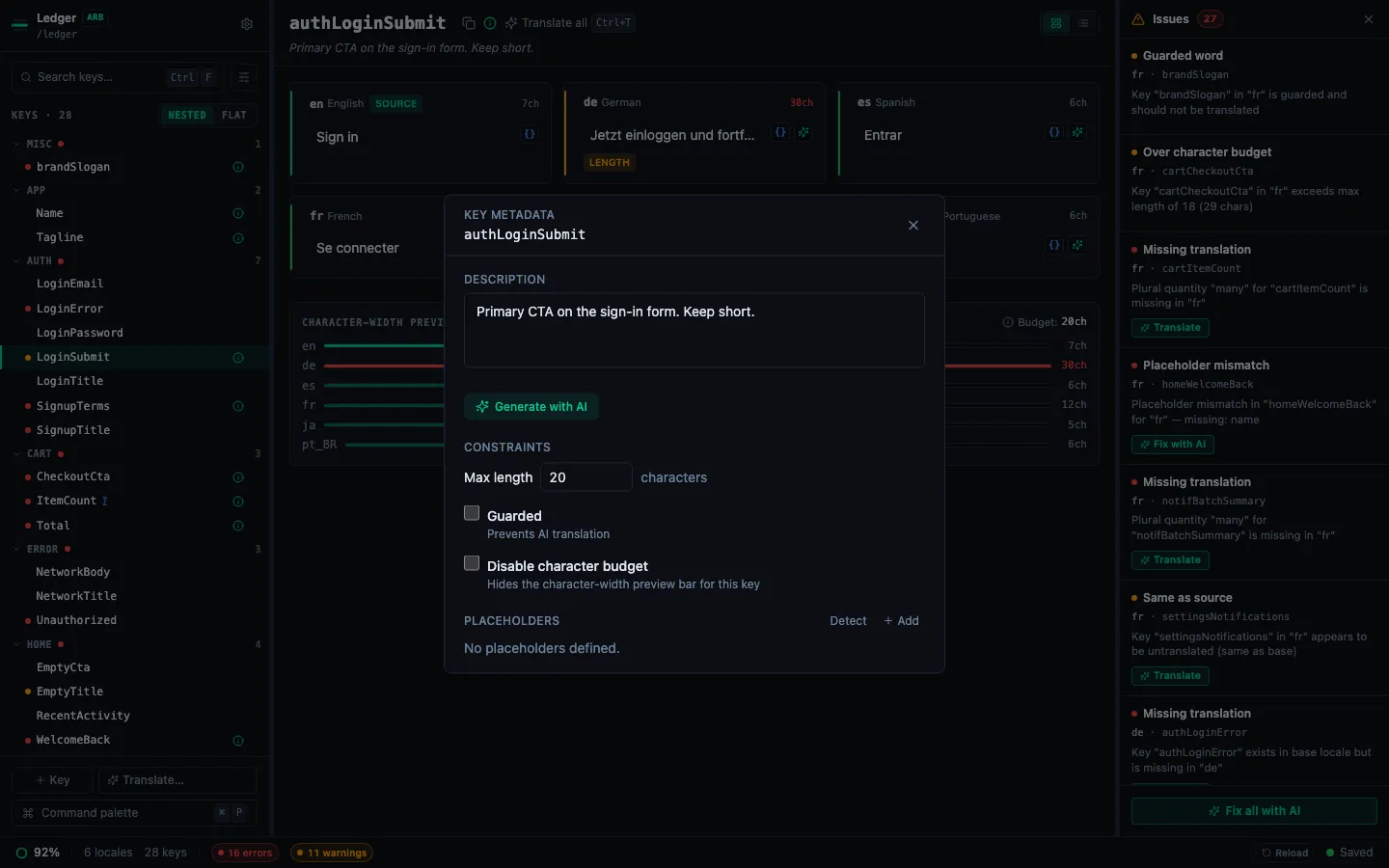
A human-readable explanation of what the string is for — where it appears in the UI, any context that affects tone or length.
How StringLane uses it:
- Passed verbatim to the AI translation prompt as context for that specific key
- Shown in the key detail panel in StringLane (List View)
Example:
"@submitButton": {
  "description": "Button label on the payment confirmation screen. Must be short — 2 words max."
}
x-max-length
An integer maximum character count for the translation. Useful for UI elements with fixed display space: button labels, tab titles, notification titles.
How StringLane uses it:
- Translations exceeding this length show a Length badge (yellow)
- Also passed to the AI prompt — the model is asked to respect the limit
Example:
"@doneButton": {
  "description": "Button in the navigation bar",
  "x-max-length": 10
}
x-guarded
A boolean flag (true) marking this key as containing a brand name or guarded term that must never be translated.
How StringLane uses it:
- If a target locale's value differs from the base locale's value for a guarded key, a Guarded badge (yellow) appears
- The guarded check runs before the "untranslated" check — a guarded key with the same value as base is correct behavior, not a translation failure
Example:
"appName": "StringLane",
"@appName": {
  "x-guarded": true
}
StringLane never modifies annotations
Opening a project in StringLane and editing translations will never touch the @key objects. Your metadata annotations are safe. StringLane only reads them, never writes to them.
Adding annotations
Edit your ARB files directly in any text editor or IDE. StringLane will pick up the changes the next time you open the project (or, if the project is already open, on the next reload).
ARB annotations are a Flutter/Dart convention — they're supported by flutter gen-l10n and recognized by the intl package. StringLane extends their use with x-max-length and x-guarded for validation purposes.